Kilndar

Kilndar · booking platform for craft studios

The booking platform built by studio owners.

We run five pottery studios across the UK. Kilndar is the system we built because nothing else survived our Saturdays — and we still run every studio on it, every day.

A real week in the demo studio — not a mockup. Every screenshot on this page is the product itself.

Battle-tested daily across 5 UK studios

A busy Saturday at Social Pottery: 300 guests through the door and 100 collections handed back — every piece tracked, fired and emailed by Kilndar.

That volume is why this platform exists. We tried the generic booking tools; none of them knew what a kiln was, what a collection shelf looks like at 4pm, or why a course needs a rest week. So we built the one that does — for ourselves first.

  • 5

    UK studios run on it daily

  • 300

    guests on a single Saturday

  • 100

    collections the same day

No stock logos, no invented testimonials — those numbers are our own studios' books. Honesty is the brand.

What it does

Everything a studio day throws at you, in one calm system.

Eleven things generic booking tools get wrong about craft studios — and how we built each one properly.

The flagship — kiln & collection tracking

Your customers' pieces, tracked to pickup — with automatic ready-to-collect emails.

Every checked-in visit can leave pieces behind. Kilndar follows each one — created, glazing, in the kiln, drying, ready — batches them into kiln loads, emails the maker the moment their work is ready, and books the collection visit so the shelf actually empties.

Not a potter? Every label adapts to your craft — kilns can read as looms, presses or ovens; “pieces” can be prints, candles or loaves. The tracking stays the same.

  • Bookings that survive a Saturday

    Fixed classes and drop-in slots, prepaid at checkout, with capacity enforced in the database — not the interface. Fifty people can hit the last two seats at once; exactly two get them.

    Every activity gets its own SEO landing page — gallery, FAQs, reviews, structured data.

  • A front desk that keeps up

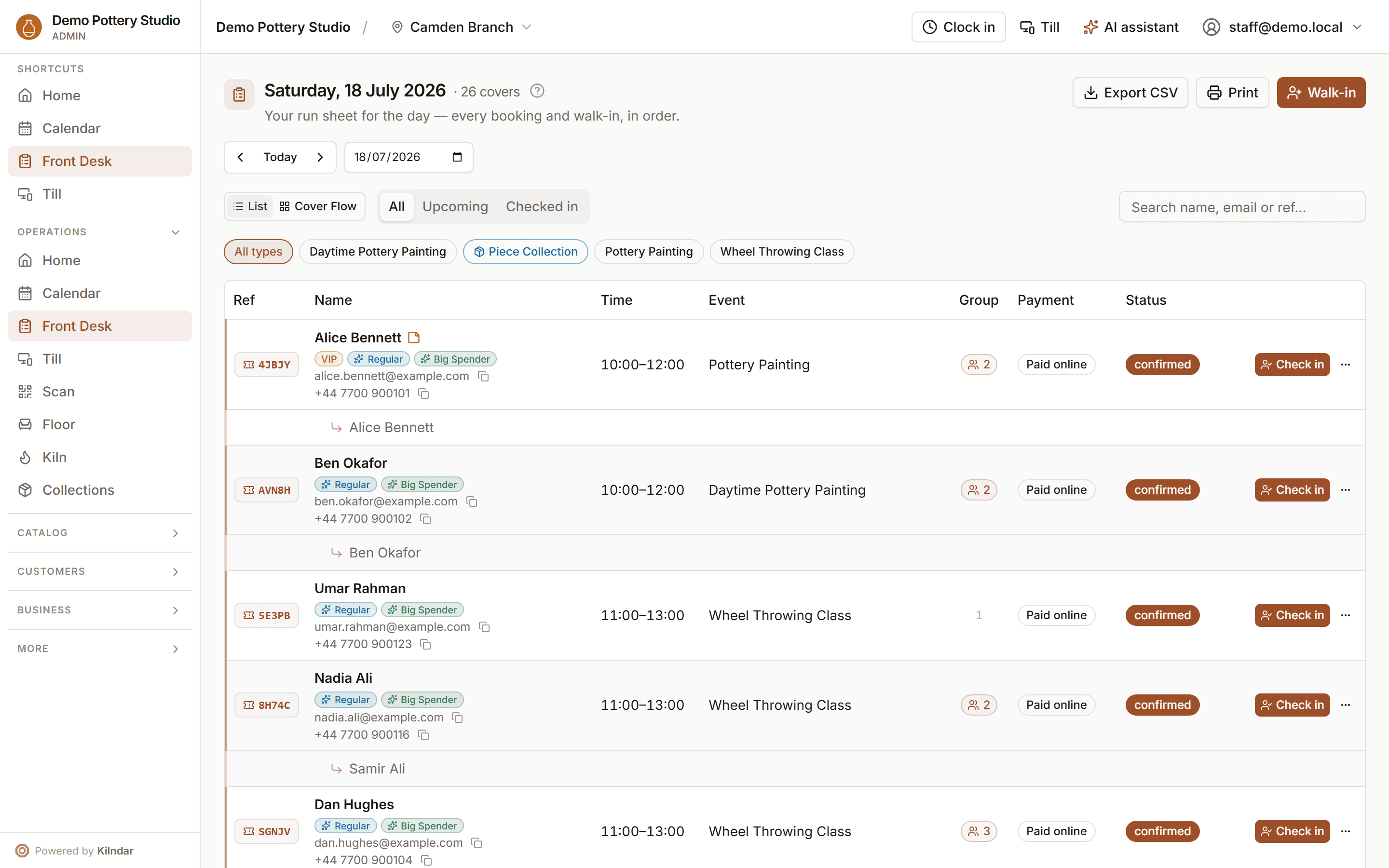
    Today's board in one screen: who's in, who's next, who walked in. Check a party in and the floor map opens with their table already highlighted — tap to confirm, pick another, or squeeze a walk-in onto a busy bench.

    Every ticket carries a QR code — one scan checks the guest in and starts their pieces' journey.

  • A till for the counter tablet

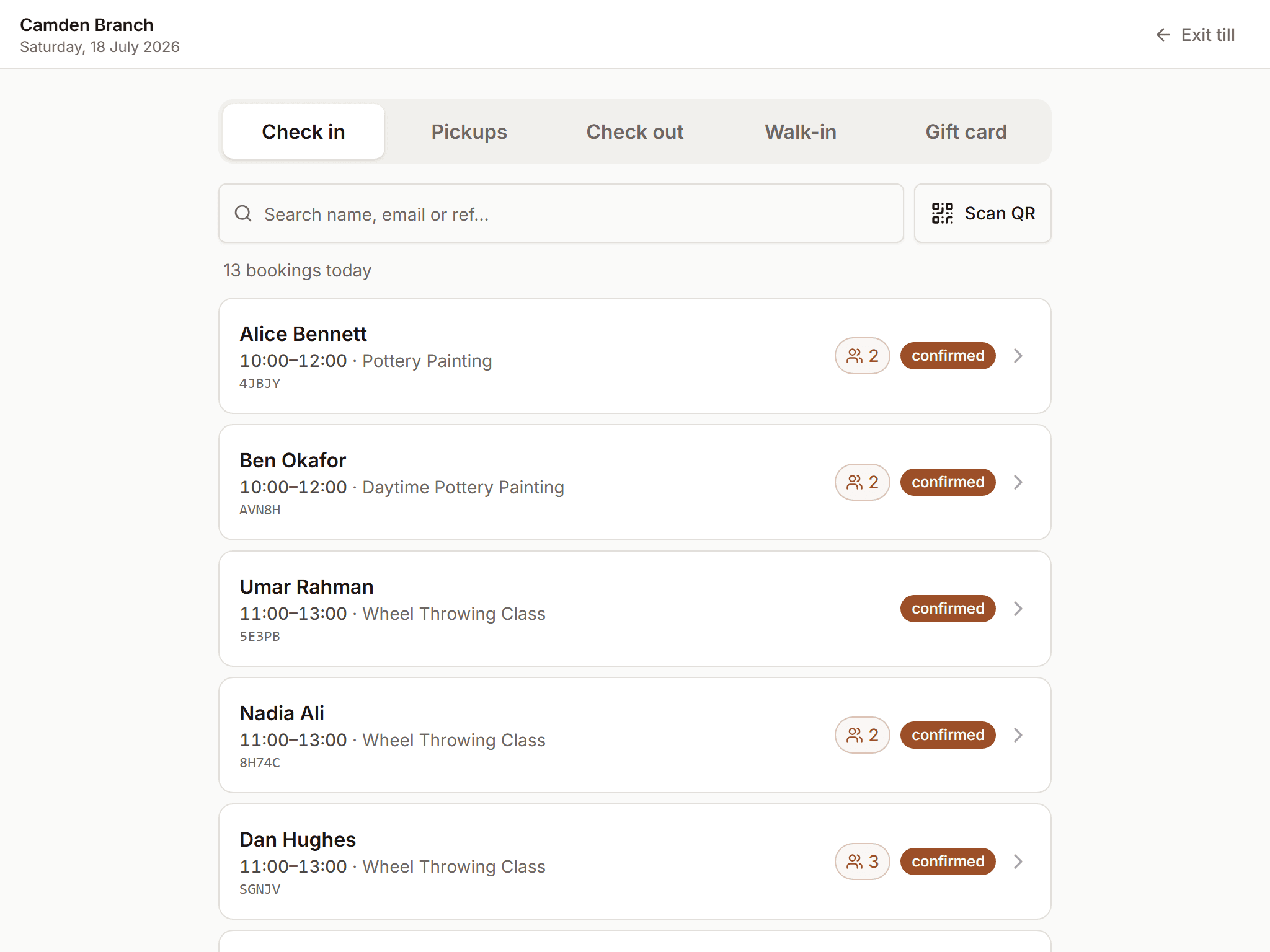
    A chrome-less, touch-first counter mode: check-ins with the seating map, pick-up visits with piece photos, check-out, walk-ins and gift-card scans — and when a deposit-paid party arrives, the balance due is right there to collect.

    Shared by the whole reception — staff switch in a tap, so one tablet by the door is everyone's till.

  • Memberships & credit hours

    Credit packs, monthly plans and launching-soon teasers. Members book with credits instead of cards, and a per-entry ledger keeps every balance honest.

    10-hour class cards, monthly allowances, per-activity scopes — all configurable.

  • Marketing that runs itself

    Built-in automations — review requests after a visit, come-back nudges, we-missed-you notes — plus campaigns with segments and a visual drag-and-drop email designer.

    Consent-gated by default; unsubscribe handling is built in, not bolted on.

  • Courses, not just classes

    Multi-week terms sold as one enrolment: same bench every week, attendance per meeting, and rest weeks mid-term so work can dry before it's glazed.

    A six-week wheel course and a four-week term with a rest week ship in the demo studio.

  • Floor plans & table combinations

    Draw your rooms, place your tables, and combine them for the fourteen-person hen party. Room capacities drive availability, so the floor and the calendar never disagree.

    Room-scoped blocks let you close half the studio without closing the diary.

  • Retail, on the same rails

    A native product catalog — photos, categories, stock that can't oversell — sold on a shop that feels like one: add to cart, keep browsing, check out, with orders and receipts in the same system as bookings.

    On Square or Shopify? A sync seam mirrors their catalogs read-only beside native products.

  • Built for the team behind it

    Rotas drafted from the week's real bookings, a scheduled-hours report with CSV export for payroll prep, and an admin each staff member uses in their own language — English or Spanish.

    Per-business currency too — GBP, EUR or USD — and you pick which languages your public site speaks.

  • Developers welcome

    A documented REST API with org-scoped keys and signed webhooks for bookings, cancellations and piece updates — build your own site on top, or wire in the tools you already use.

    An embeddable booking widget drops into any site with one script tag — themed to match, down to your own custom CSS.

  • Pottery is our home turf —

    but nothing here is pottery-only. Labels, activity types, taxonomy and emails are configurable per studio, so the platform speaks your craft's language, not ours.

A working day

A few more screens from a working day.

Swipe through real captures from the live demo studio — the same screens our own front desks run every day. Nothing staged, nothing mocked up.

demo.kilndar.com/admin/desk
The front desk board: today's parties clustered under their lead booker, each checked in with a single tap
The front desk — today's parties under their lead booker, checked in with one tap.
demo.kilndar.com/admin/till
The till: a touch-friendly reception screen for walk-ins, arrivals and pickups
The till — walk-ins, arrivals and pickups on a touch-friendly counter screen.
demo.kilndar.com/admin/calendar
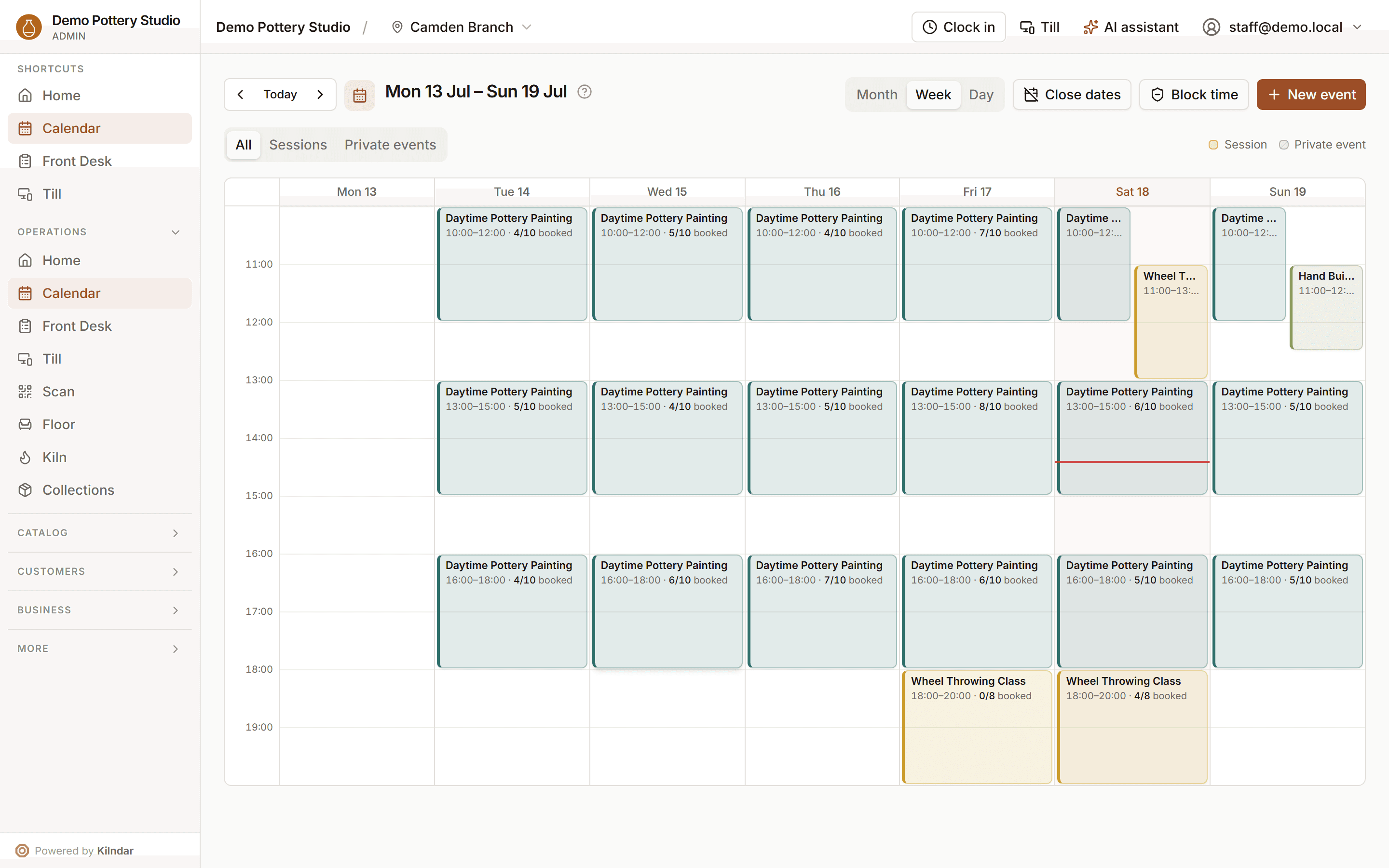
The calendar week view: every session, class and private event across the studio in one grid
The calendar — every session, class and private event across the studio in one view.
demo.kilndar.com/admin/minisite
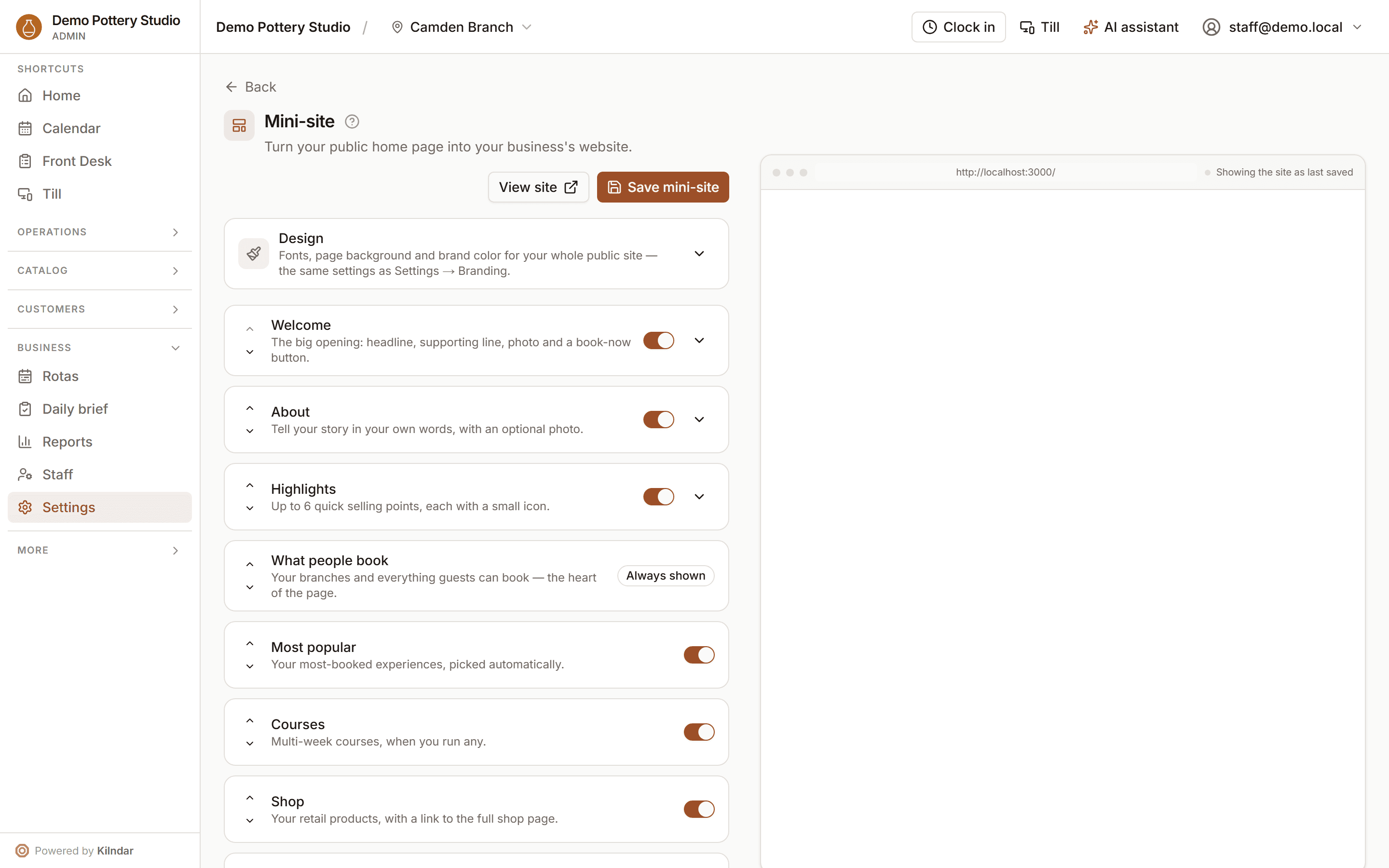
The mini-site editor: a branded public booking site, edited live with a preview
Your mini-site — a branded booking site, edited live, no developer needed.

See it working

The same screens our own front desks run every day.

Straight from the live demo studio — real bookings, real kiln loads, real numbers. Poke around it yourself from the demo link above.

Home

The day, the moment you sign in

Arrivals, pick-ups due, who's on shift, revenue so far and today's session fill — one glance and you know what kind of day it is. Below it, AI suggestions spotted in your own numbers, each linking into the screen that fixes it.

Floor plans

Draw the floor you actually have

Round and rectangular tables with real seat counts, walls, doors, the kiln in the corner — and named table combinations for the fourteen-person hen party. The day view seats parties straight onto it.

Your storefront

A booking site your studio doesn't have to build

Every branch gets a bookable page out of the box: activity cards with real prices, category filters, review stars from actual visits, and SEO landing pages per experience. Bring your own site later via the API and widget if you want.

The AI layer

An ops copilot that interprets. You confirm.

AI runs through the whole platform on one safety model: it reads your data and drafts the work, deterministic code resolves and executes, and money or capacity never move without your explicit confirm — audited like every sensitive action.

  • The ops console

    Ctrl+K from anywhere in the admin: type “cierra el slot de las 2pm del sábado” — any language — and see a preview of exactly what will change. Nothing runs until you press Confirm.

  • Business suggestions

    The Home dashboard reads your own numbers once a day — quiet sessions, rota gaps, occasions coming up — and suggests the next move, each with a link into the right screen.

  • Email builder & campaign proposals

    Describe the send — “spring promo for wheel classes, warm tone” — and get a branded, editable design. Or let it propose campaigns against your existing segments; it can never invent an audience.

  • Draft generators

    A new activity or course drafted from one sentence — description, highlights, FAQs, schedule scaffold — landing in the normal editor for your review, never straight to public.

  • SEO health & fixes

    Every landing page gets a deterministic 0–100 score with its failing checks spelled out, plus per-field AI fixes you preview and apply yourself. Nothing auto-saves.

  • Rota advice

    When the rota generator can't fill a role, the advisor suggests practical fixes with real names from your own availability — guarded so a hallucinated person can never render.

The preview-before-execute moment: the console shows exactly what will change, and nothing happens until Confirm.

Early access

We're onboarding founding studios.

No public pricing yet — we'd rather meet you, look at how your studio runs, and set you up properly. Founding studios help shape the roadmap and keep preferential terms when pricing lands.

Book a demo

Book a demo

Tell us about your studio.

A short note is enough — we'll reply from a real inbox, usually within two working days, and set up a walkthrough of the live demo studio with your kind of workload.

  • A real walkthrough, not a sales deck — you drive, we answer.
  • Owner to owner— you'll talk to people who lock up a studio at 10pm too.
  • No spam, ever — we use your details to reply to this message and nothing else.

Prefer email? Write to hello@kilndar.com.

We reply to this message and nothing else. No list, no drip campaign.