
Everything in Kilndar
The whole toolshed, honestly listed.
No feature-matrix theatre: everything below is in the product today unless it says otherwise, and every screenshot is the running demo studio. Poke it yourself any time.
Run the day
The boards your counter runs on
One screen per job: the Home dashboard to read the day, the calendar to plan it, the front desk and till to work it, the production and collection boards to hand everything back to the right person.
Home dashboard
Sign in and today is already on screen: arrivals, pick-ups due, who's on shift, revenue so far and session fill, with AI suggestions from your own data underneath. Every card respects roles and modules: hosts never receive revenue numbers.
Operations calendar
Month, week and day views of every session and drop-in window, with closures, capacity blocks and room-scoped blocks painted on the same surface. Recurrence covers once, daily, weekly, monthly and multiple-sessions-per-day patterns.
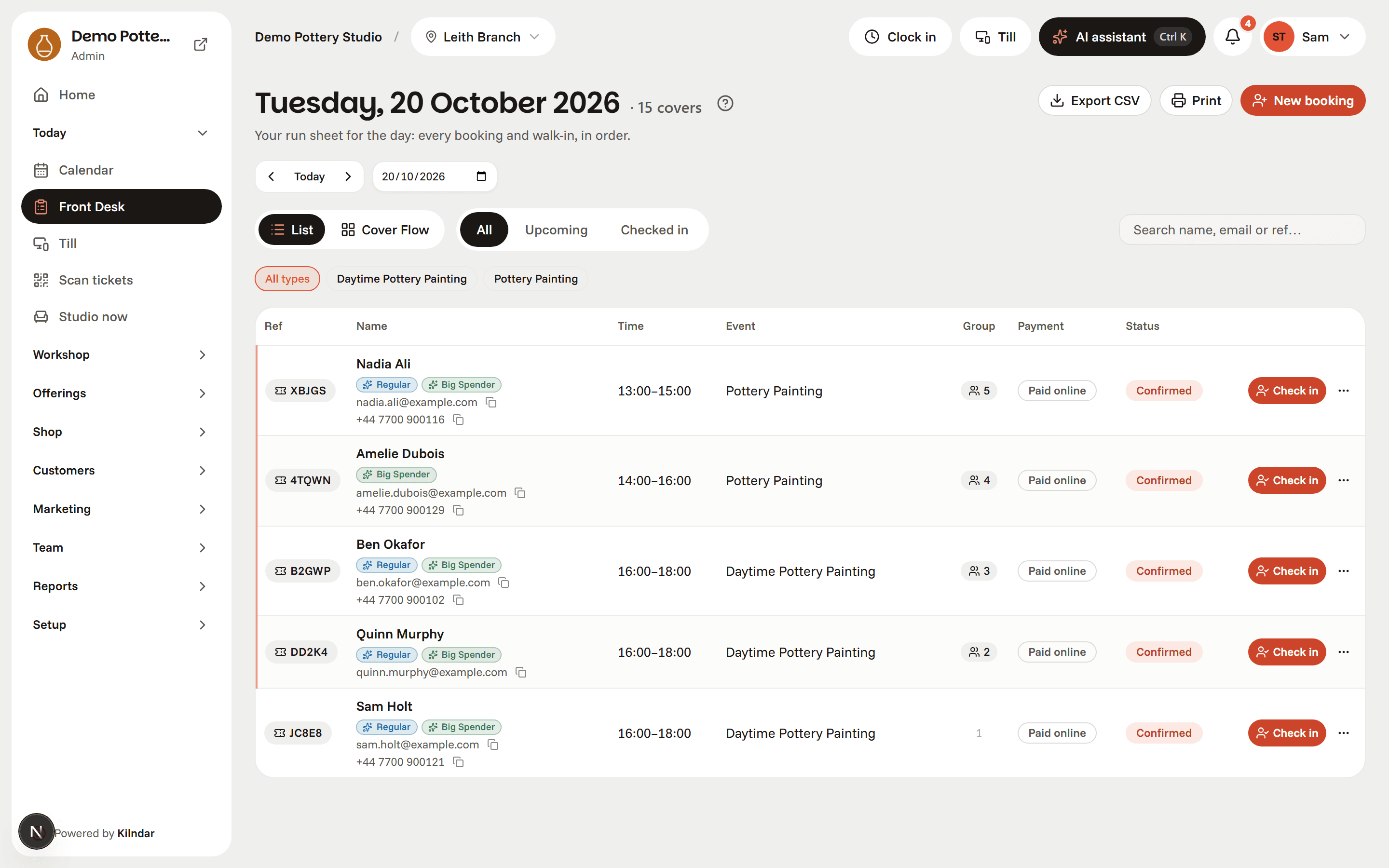
Front desk
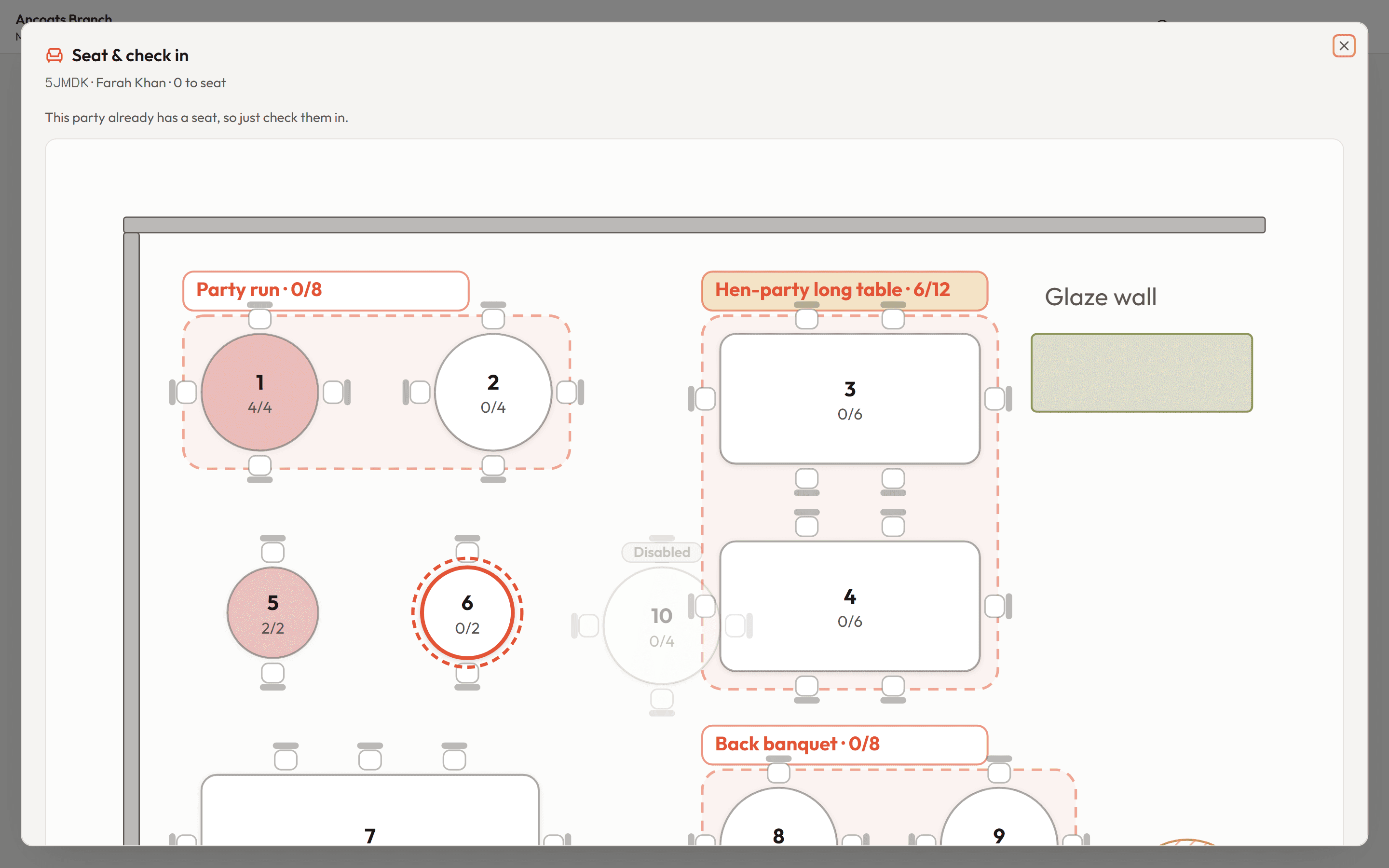
The day at seat level: groups clustered under their lead booker, one-tap check-in, walk-ins, no-shows and cancellations in the same list. Check a party in and a visual floor map opens with their table pre-highlighted: confirm it, pick another, or squeeze an over-capacity party onto a busy bench. Filter by event type, search by name or reference, print or export the run sheet.
Seat-at-check-in floor map
The moment a party arrives, their room's floor map opens with a suggested table already highlighted from party size and availability. Tap to confirm, tap a different table to move them, or drop an extra guest onto a full bench when you're squeezing them in. Front desk and till both hand out seats the same way.
Till counter mode
A chrome-less, touch-first screen for the counter tablet: check-in with the seating map, pick-up visits with piece photos, a check-out queue ordered by leave time, walk-ins, gift-card scanning, and piece photo intake at the handover moment. Deposit balances are collectable on the spot, and staff switch in a tap, so one shared tablet is the whole reception's till.
Dine-in QR ordering
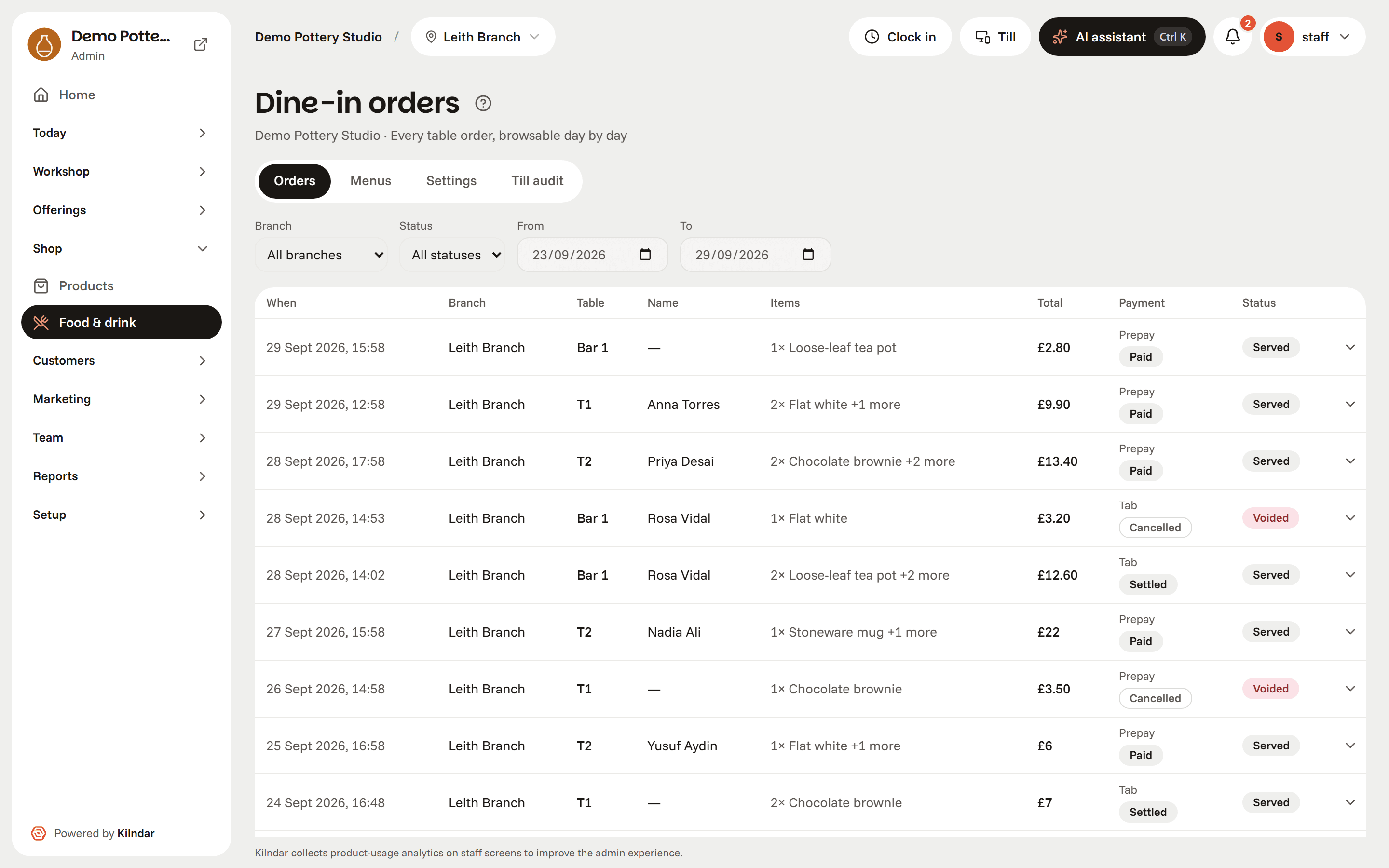
Tables carry their own QR (or one menu link for the whole branch), opening a live menu drawn from your retail catalog, with serving windows and per-branch prices. Guests pay up front through Stripe or run an open tab settled at the till; orders land in the till's live queue (new, preparing, ready, served), staff place counter orders and staff-only discounts, and every ticket keeps a browsable history.
QR ticket scanning
Every booking carries a QR e-ticket. The scanner page checks guests in with the camera (duplicates and invalid codes handled, 1D gift-card barcodes understood too) and falls back to manual lookup when there's no camera about.
Made-item tracking
Pieces move through configurable production stages (from created to ready to collected) in batches, with photos so staff can match the thing on the shelf to the person at the counter. Guests log and photograph their own pieces before they leave, from a QR on the counter, and the ready-to-collect email shows those photos.
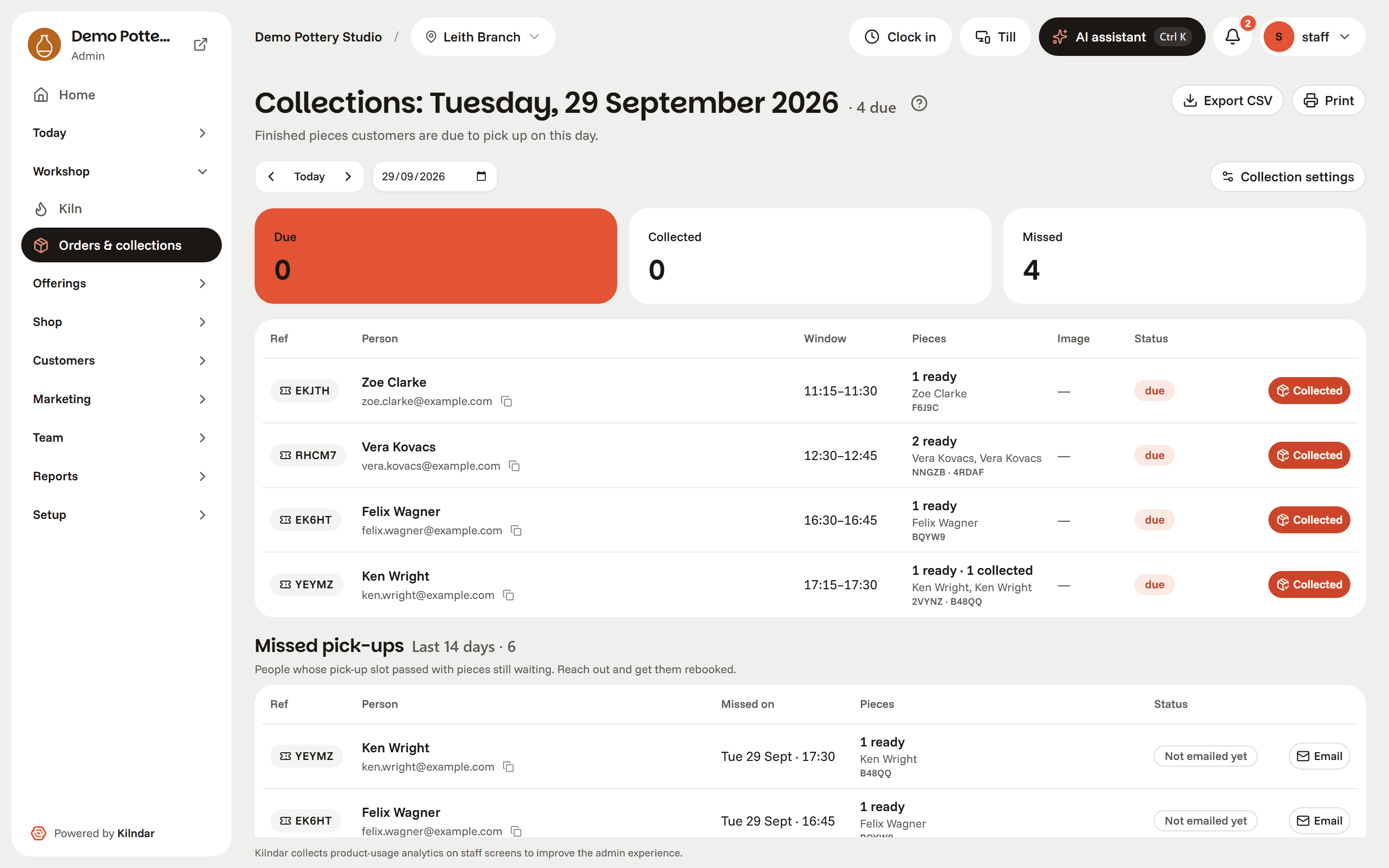
Collections board
Pick-up visits book themselves through the ready-to-collect email, then appear on the day they chose with the piece photos, codes and contact details. Anyone who has not collected is reminded on a cadence you set (first nudge after a week, then weekly, up to three) until the shelf is clear.
Floor plans & seating
Draw rooms, tables and seat counts; save named table combinations; auto-seat the day's parties or drag them yourself. Room capacities feed availability, so the diary and the floor can never disagree.
Rotas
A demand-driven shift generator that reads the week's actual bookings, drafts a rota, and explains every assignment. Week grid and per-day timeline; staff see their own shifts in their profile.
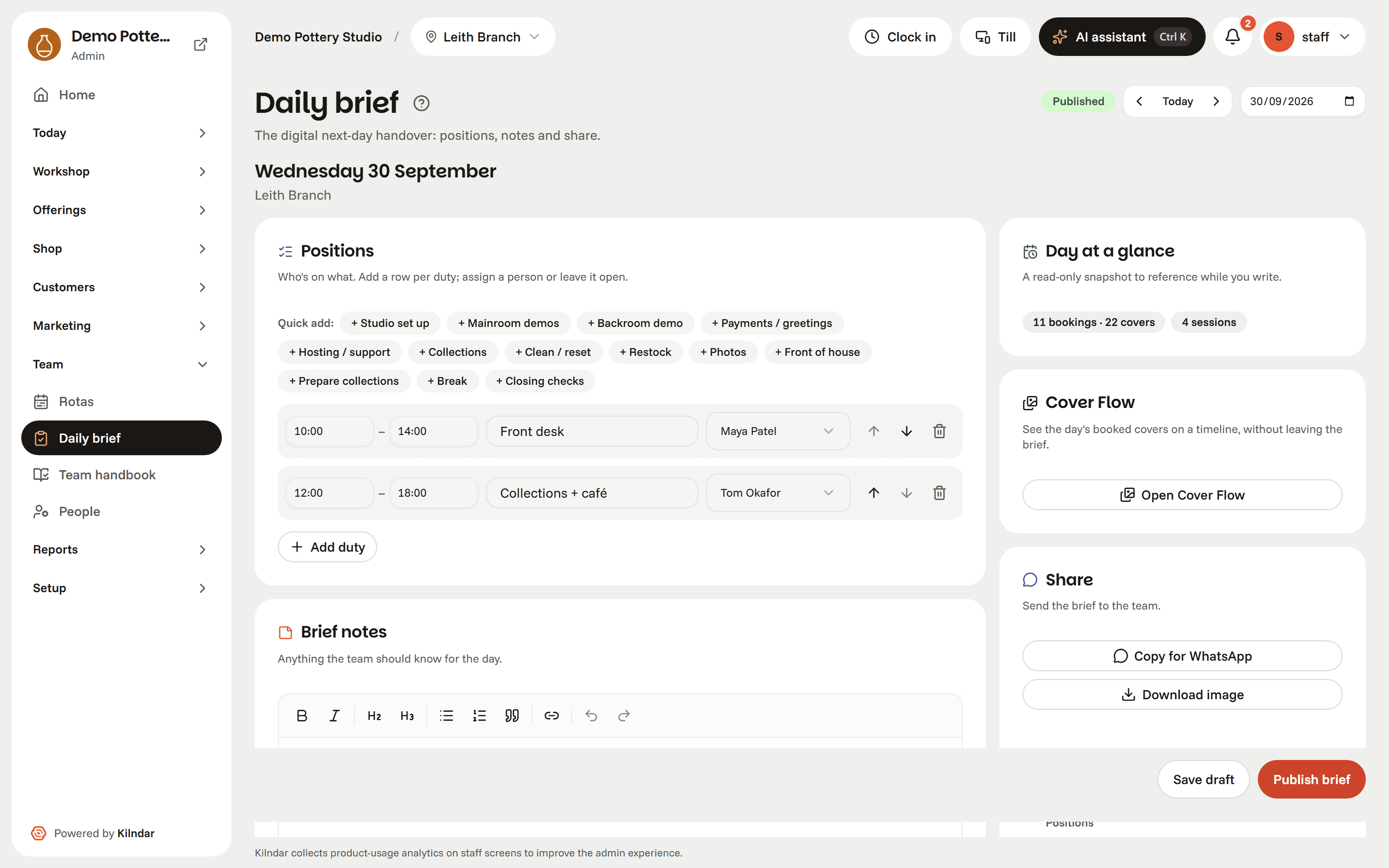
The daily brief
Tomorrow's handover, written once per branch: notes plus a positions roster with times and names, beside the day at a glance (arrivals, covers, sessions and matching enquiries). Publish and the whole team reads it in-app (drafts stay private); today's brief greets everyone on the Home dashboard, and it exports as a WhatsApp-ready summary or an on-brand PNG for the noticeboard.
Till mode at tablet size, the counter screen with zero admin chrome: tap a card to check the party in.
Sell experiences
A storefront that sells while you teach
Every experience gets a real landing page; every booking goes through one capacity-safe engine, whether it came from your site, the widget or the counter.
SEO landing pages
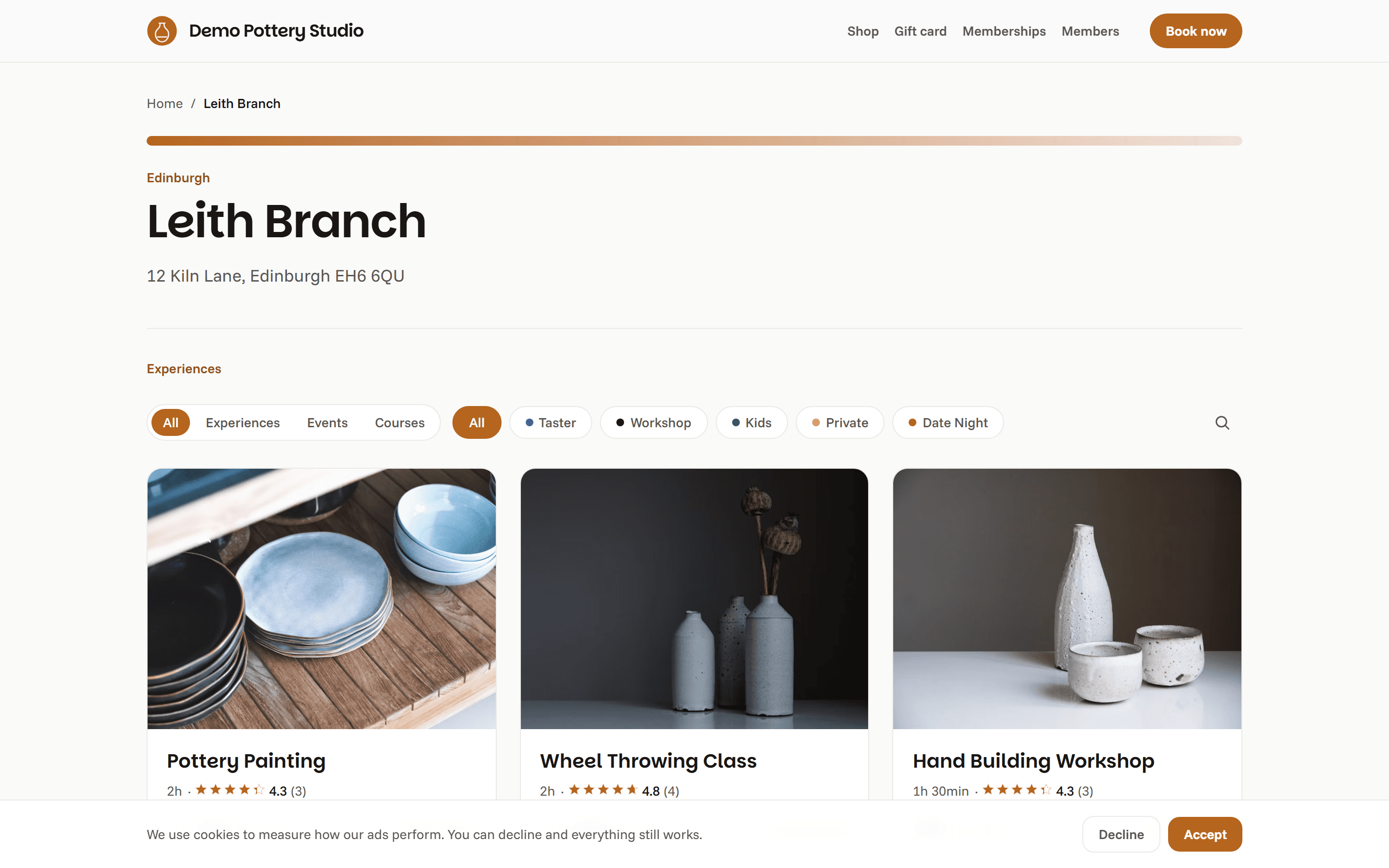
Gallery with video, highlights, FAQs, reviews with rich-snippet stars, structured data and per-locale URLs, for every activity, course and branch, generated from your catalog.
A booking engine that can't oversell
Capacity is enforced in the database, not the interface. Pending holds expire on their own, arrival pacing throttles busy windows, and fifty simultaneous checkouts for the last two seats end with exactly two bookings.
Courses & terms
Multi-week enrolments sold as one seat: attendance per meeting, roster across the term, and rest weeks mid-course shown honestly on the public schedule.
Pricing that matches the till
Adult and child tiers, add-ons, promo codes, VAT-inclusive prices with proper VAT receipts, and in-store or comp payments in the same ledger as Stripe.
Deposits, settled at the desk
Per-activity deposits: guests secure the booking with part of the price online, and the balance due follows the booking to the front desk and till, collected in person when they arrive.
Gifting
Gift an experience with a personal message and a redeem link that books itself, or sell amount cards through GiftUp and redeem them at checkout.
Memberships & credit packs
Monthly plans and class cards with per-entry credit ledgers. Members log in and pay with hours inline on the normal booking flow; balances can't double-spend.
Private events & enquiries
A structured enquiry pipeline with threads, quotes the customer accepts online, deposits, and automatic capacity blocks when the party is confirmed.
Waitlist & self-service
Full sessions take a waitlist; customers cancel or reschedule themselves inside your policy window from the tokenized booking page, no account required.
Hosted mini-site
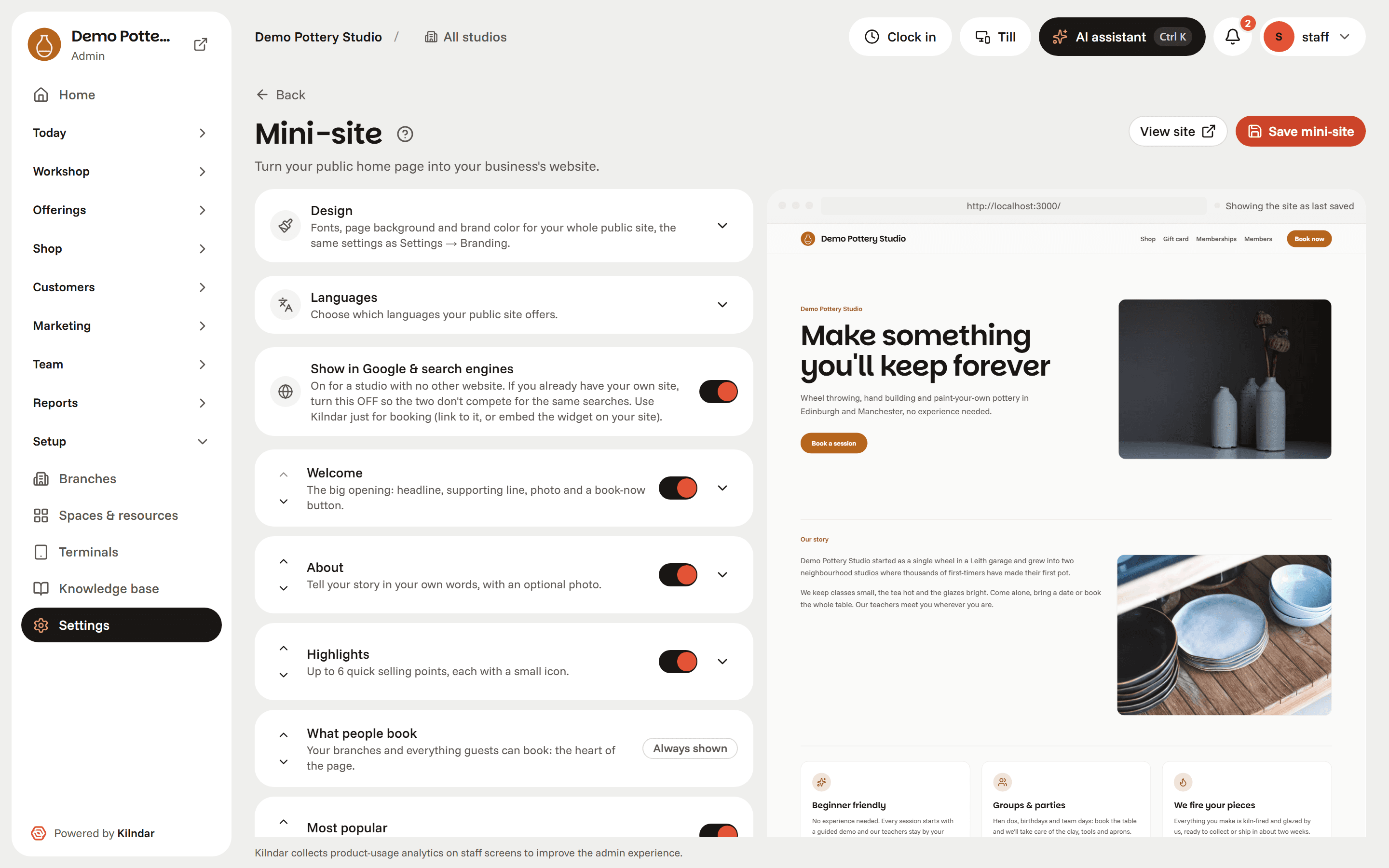
Studios without a website get one: a customisable public home (welcome, story, highlights, what people book, shop, reviews) edited beside a truly live preview that shows your unsaved draft to you alone. Fonts, brand colour and page background included.
Location & travel modes
Every activity, course and branch page carries a proper find-us section: venue details, an embedded map, and how-to-get-there travel modes, the things guests actually check before booking.
Embeddable widget, themed to your site
Already have a website? The booking flow drops into it with one script tag, and you build the look in a live-preview embed builder: horizontal or vertical layouts, corner and card styles (row, image-top or full-bleed overlay), customer filters by type, category and search, and custom CSS when you want it matched pixel-for-pixel to your own brand.
Every experience is a landing page with inline booking. This one is the demo studio's, screenshotted live.
Sell things
Retail on the same rails as bookings
Mugs, glaze kits, tool sets. The things on your shelves get the same treatment as your classes: one catalog, one stock truth, one ledger.
Product catalog
Native products with photos, categories and prices, managed in the admin like everything else. Stock is enforced at the database level, so the last tool set can't sell twice.
A public shop page
Products sell on their own shop page and through the mini-site's shop section: add to cart and keep browsing, with a live confirmation the moment an item lands and a one-tap jump to checkout. Buy online for pickup at the venue, with a receipt email and a tokenized order page, no account needed.
Square & Shopify sync seam
Already selling elsewhere? Synced sources mirror their catalogs read-only beside your native products, with a sync-now button. The OAuth connect flows for live accounts are still on the bench, listed honestly below.
Same ledger, same reports
Product orders land in the same payment ledger as bookings, so retail takings show up in the same reports your accountant already reads.
The demo studio's shop: native products, bought online, picked up at the counter.
Know your guests
Guests you recognise, marketing that behaves
The same guest record powers the door, the segments and the sends. Consent is enforced everywhere, not remembered sometimes.
Guest profiles
Tags, notes and preferences on every customer (with automatic ones for regulars, big spenders and birthdays), surfaced right on the front desk row when they walk in.
Loyalty stamp cards
A stamp per checked-in visit (one a day, weighted per activity) fills a card you design with your own artwork and stamp icon. A full card automatically emails a single-use voucher bound to that customer, with an expiry you set. Referrals reward the referrer only when the friend's first booking actually checks in; the flip card, voucher wallet and referral code live in the member portal.
Segments
Build audiences from visits, spend, branch, attendance and tags; the same segment definitions drive the customer list and every campaign.
Reviews
Post-visit review requests, moderation before publishing, replies, and aggregate stars on landings with the structured data Google actually reads.
Campaigns with scope you can read
Every campaign wears its audience scope (one branch or all branches) right on the list, and any sent campaign duplicates into a fresh draft that reopens in the composer for the next send.
Automations
Built-in, editable flows: what-to-expect the day before, review request after, come-back nudges, no-show win-backs and abandoned-checkout recovery.
Email designer
A drag-and-drop designer with your own components (event cards, gift blocks, responsive columns), plus a template gallery that adopts your branding, and a plain WYSIWYG for quick sends.
Honest usage metering
Marketing sends count against a visible monthly meter that warns at 80%. Transactional email (confirmations, ready-to-collect notices) is never counted.
Consent & GDPR
Per-customer marketing consent, one-click unsubscribe handling, and export or deletion of a customer's data on request.
Campaigns to consented segments, with the sends meter one tab away.
Run the business
The parts your accountant and your manager ask about
Multi-branch from day one, roles that actually restrict, numbers straight from the diary, and an API when you outgrow the defaults.
Branches
Each venue keeps its own catalog, opening hours, floor plans, staff scoping, contact details and socials, all under one business.
Staff & roles
Invite by email, assign owner, manager or host, scope hosts to their branch. Every sensitive action is capability-checked on the server and written to an immutable audit trail.
Staff self-service
Each team member manages their own password, sees their published shifts and month's hours, and opts in or out of notifications: daily digest, new enquiry, new booking, cancellations.
Scheduled-hours report
The rota feeds an Hours view: scheduled hours per team member for any month, with CSV export for payroll prep. No re-counting shifts off a wall planner.
Currencies & languages
Per-business currency (pounds, euros or dollars) everywhere money appears; a bilingual admin where each staff member works in English or Spanish, their own choice, on the same screens; and per-studio public languages, so you pick exactly which languages your booking site offers guests.
Guided tours & tutorials
New staff aren't left to poke around. Guided in-app tours walk them through each screen the first time they open it, spotlighting the real controls they'll use right where they'll do the job, with a plain-language "what is this?" on every page.
Knowledge base, written once
One article can serve the public help centre (live on your booking site at /help), the staff handbook, and the AI that drafts enquiry replies: three switches on the same row, so a policy can't say different things in different places. Answers can be branch-scoped, unanswered guest questions queue up as ranked gaps, and a PDF or web page imports as draft Q&A you approve one by one.
Handbook with sign-off
The staff side of the knowledge base is a real handbook: version-pinned acknowledgements (republish a page and it un-reads for everyone), AI-drafted quiz questions graded on the server, and a coverage view showing who has read what.
Reports & insights
Revenue and covers by period, activity and branch; month-over-month growth; occupancy, no-show rates, top customers and funnel tiles. CSV export on everything.
Branch settlement
Owner-only reconciliation: what each branch redeemed in gift-card value and membership credits over any range, with an HQ/unattributed row that never disappears, gift figures net of reversals, and a CSV whose headers carry their units. The dine-in money audit sits behind the same owner capability.
Refunds
Full or partial service-recovery refunds on card payments, gated to managers, tracked against the booking, and subtracted honestly from reported revenue.
Fits your craft
Feature modules switch off what you don't run, and every noun (piece, kiln, studio, branch) is configurable, so a glass studio or a candle workshop reads like itself, not like pottery.
Ads-ready
Your own GA4, Meta and TikTok pixels, product feeds for Merchant Center and catalogs, and server-side purchase conversions from the payment webhook, deduped against the browser.
Developers welcome
A versioned REST API with scoped keys, signed outbound webhooks, an OpenAPI spec and docs. Build your own site on top or wire in the tools you already use.
Plans, members and balances: recurring revenue without another tool.
The AI layer
AI that drafts and interprets; you confirm
One safety model everywhere: the AI reads your data and proposes; deterministic code resolves and executes; money and capacity never move without your explicit confirm, and every action lands in the audit trail.
The ops console
Ctrl+K anywhere in the admin: “close the 2pm slot next Saturday” (in any language) becomes a preview card showing exactly which sessions and bookings are affected. Nothing executes until you press Confirm; read-only lookups just answer.
Business suggestions
The Home dashboard looks at your own numbers once a day (quiet sessions, rota gaps, occasions coming up) and turns them into suggestions, each linking into the screen that fixes it. Findings are detected deterministically; the AI only phrases them.
Email builder & campaign proposals
Describe the send and get a branded, editable design in the designer. “Propose a campaign” goes further: 2–3 ideas grounded in your real context, each pointing at one of your existing segments, so a hallucinated audience can never reach the composer.
Activity & course draft generators
“Draft with AI” on the catalog lists: one sentence becomes a full draft (description, highlights, FAQs, meeting schedule) created through the normal save path and opened in the editor with a review banner. Nothing goes public unreviewed.
SEO health & fixes
Every landing page gets a deterministic 0–100 score computed live from the editor form, with failing checks and hints. Per-field AI fixes (rewrite the description, generate FAQs, suggest meta) return previews you apply yourself; saving stays manual.
Rota advice
When the rota generator can't fill a role, the advisor turns the same structured context into practical suggestions with real names: “Maya is under target and free Thursday evening”. A guard drops anything referencing people or days that don't exist.
The preview-before-execute moment, captured keyless: the sample interpreter parsed the flagship command and nothing runs until Confirm.
On the bench
Being built right now
We ship every week, straight to studios running on Kilndar. These are on the bench today. Ask in a demo and we'll show you where they stand.
Square & Shopify connectOn the bench
The retail sync seam is live against test doubles; the OAuth flows that link a real Square or Shopify account are the remaining piece.
Self-serve custom-domain onboardingOn the bench
A studio can already go live on its own domain: the proxy routes it the moment we set it. What's left is the self-serve wizard that verifies DNS and attaches the certificate for you, instead of us wiring it by hand.
A marketplace across studiosOn the bench
A public place to discover the studios running on the platform and book across them in one flow. The billing seam is already wired (marketplace bookings carry a commission, direct bookings never do), but the consumer-facing discovery and checkout are what's left to build.
SMS reminders, Wallet cards and Mailchimp syncOn the bench
Text reminders for bookings and collections, loyalty cards in Apple and Google Wallet, and a Mailchimp sync for studios keeping their marketing where it is. Ask for one in a demo and it moves to the front of the queue.
Easier shown than listed.
Twenty minutes on a live demo beats any feature page. Bring your busiest Saturday and we'll run it.
Book a demo